Mobile Internet Overview
Internet Speed and Data
Our mobile hotspot-based internet service includes unlimited 5G and 4G LTE access. Subscribers receive 100GB/month of high-speed prioritized data, with speeds typically ranging from 12–40 Mbps depending on the coverage area. After 100GB, T-Mobile may begin data deprioritization, meaning heavy data users may experience slower speeds during times of high network traffic to help ensure the best possible experience for all users. Deprioritized mobile hotspots remain connected to the internet but may operate at reduced speeds.
Subscribers may connect up to ten devices to one mobile hotspot. Our mobile hotspots work best for desktops, laptops, tablets, and phones. They do not work best for streaming on televisions or for game systems.
Internet Provider
Our internet service provider is T-Mobile through a partnership with either Mobile Beacon, Mobile Citizen, or 35 Mile. Current and prospective subscribers can check their exact address on T-Mobile coverage map. After putting in the address, select the name of the appropriate mobile hotspot on the right side of the webpage, clicking 'Select Device' in yellow.

Hotspot and Monthly Internet Pricing
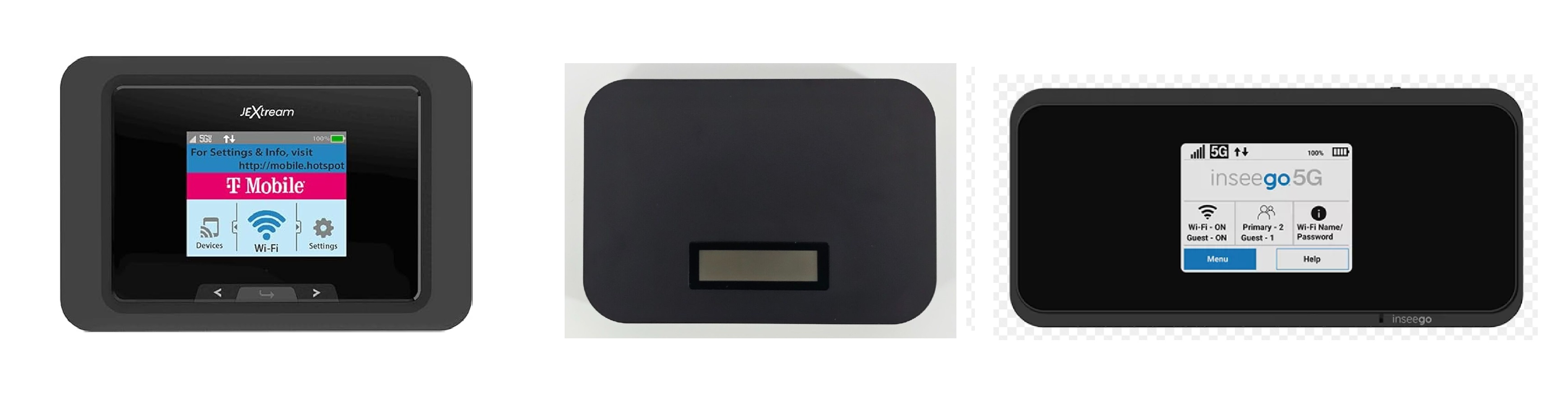
As noted above, PCs for People's mobile internet service is provided through a hotspot. Available hotspot models vary at times, but currently we are offering the Franklin T10 for $20, Franklin JEXtream RG2100, and Inseego M2000 (prices vary). The monthly cost for our internet subscription is as low as $10 for long term plans or $15-$16 per month. We offer multi-month packages as an option should you choose.
| Months | Pricing |
| 1 | $15-16 |
| 3 | $10-45 |
| 6 | $75-90 |
| 12 | $180 |
| 24 | $260 |
| 36 | $360 |
Hotspot Returns and Warranty
There is a seven-business-day hotspot return period in order to receive a full refund. The customer would be responsible for return shipping costs.
Each hotspot comes with a six-month warranty from the purchase date of the device. If a hotspot is deemed defective after six months from the purchase date, then the customer will need to purchase a replacement.
Please note:
- If a hotspot is replaced under warranty, the warranty does not start over with the new device.
- If a new hotspot is purchased, the warranty starts over with the new purchase.
Related Articles
Mobile Internet Troubleshooting
Troubleshooting Your Hotspot If your hotspot is not working as intended, please start with these basic troubleshooting steps: Check that the subscription has not lapsed by signing into your PCs for People account at pcsrefurbished.com. If the ...Purchase & Renew Mobile Internet
Purchase & Renew Internet through the ACP Program The FCC has announced that the ACP is projected to run out of funding in April 2024. No new enrollments will be accepted after 2/7/24. Internet Speed and Data Visit our ACP Program portal online at ...Connecting Your Computer to the Internet
To connect your computer to the internet, you may use wireless internet or a modem using an ethernet cable. Find the icon in the lower right corner of your computer screen. Click on it to see the list of available networks. These are the different ...Connecting Your Computer to the Internet
To connect your computer to the internet, you may use wireless internet or a modem using an ethernet cable. Find the icon in the lower right corner of your computer screen. Click on it to see the list of available networks. These are the different ...Internet Safety
The internet can be a wonderful tool when used safely. Please review the basic tips below to help you navigate the internet. Avoid Viruses A virus can harm your computer or access information on your computer’s hard drive. Use virus protection ...